
me88 App for Android and iOS
me88 has a native Android application and a mobile web version for iPhone. Both come from the site itself rather than from Google Play or the App Store, which is normal for real-money gambling apps in Malaysia and the reason your phone will ask for one extra permission along the way.
There is also a reward attached: the MYR 58 me88 APP Loyalty Rewards promotion pays you for installing it. Below is what sits in the download section, the Android install step by step, what iPhone owners do instead, what the app can and cannot do, and what to try when an install refuses to finish. The platform overview is on the me88 Malaysia home page.
What You Get in the me88 Download Section
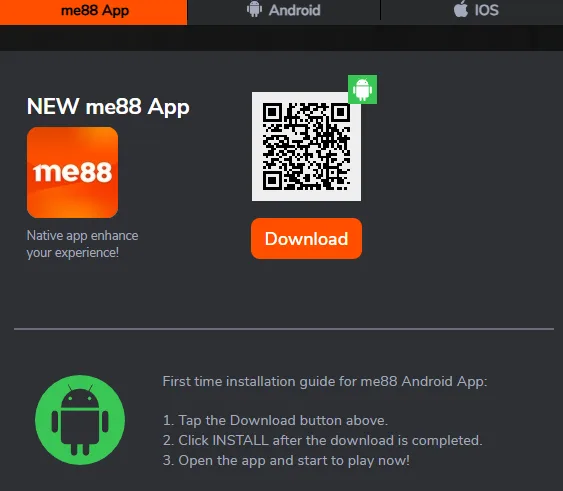
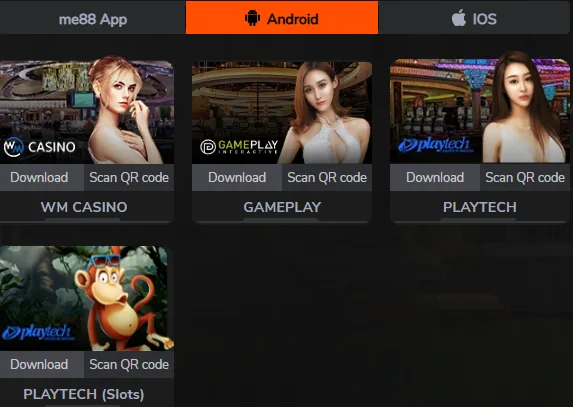
The me88 download page is split into three tabs, and knowing which one you need saves a wrong install.
- me88 App. The main application, offered as a QR code and a Download button. This is the one most players want: casino, slots, sportsbook, esports, fishing and the cashier in a single package.
- Android. Separate provider applications alongside the main APK, each with its own Download button and QR code: WM Casino, GamePlay, Playtech and a second Playtech build for slots.
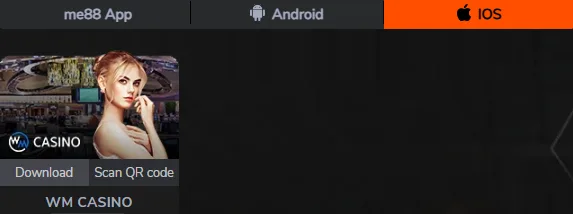
- iOS. A shorter list, with WM Casino available as a native app.
That difference in length between the Android and iOS tabs is how the platform is built rather than an oversight on the page. Android carries the full native experience, while iPhone access runs mainly through the mobile site. Provider apps are optional extras, not replacements for the main app, and nobody needs all of them.
For most players the first tab is the only one that matters. Provider apps are worth installing only if you play that studio heavily and want it to open directly rather than through the lobby.
Installing the Android App
Five steps from tap to first login. The whole thing takes a couple of minutes on a normal connection.
Step three is the one people hesitate over, so it is worth explaining. Android blocks installs from anywhere other than Google Play by default, and shows a warning when an app arrives from a browser instead. That warning is about the source, not about the file: because gambling apps are not distributed through the Play Store in this market, every real-money app in Malaysia installs this way. Granting the permission applies to the app you are installing from rather than to your phone as a whole, and it can be switched back off afterwards in the settings.
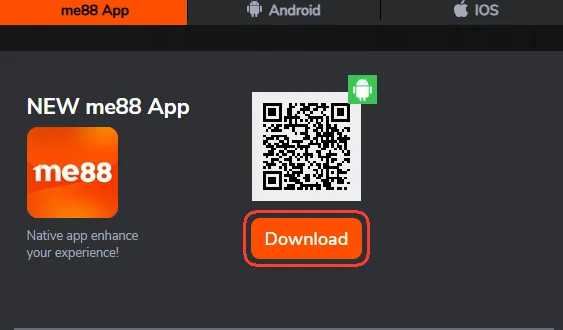
Tap Download or scan the QR code
Open the me88 App tab in the download section and press the Download button, or scan the QR code with your phone camera if you are reading this on a computer.
Wait for the APK to finish
The file lands in your Downloads folder. Let it complete before opening it, because a partially downloaded package fails to install with a parsing error.
Allow installs from this source
Android asks for permission to install apps from outside Google Play. Grant it to the browser or file manager you used, then return to the file.
Press Install
Confirm the install prompt and wait a few seconds. The me88 icon appears on your home screen once it completes.
Open the app and sign in
Launch it and enter the username and password from your account, or use the Telegram button. Balances and bonuses are exactly as you left them in the browser.
Using me88 on iPhone and iPad
There is no me88 app in the App Store, and any listing claiming otherwise is not the brand. What iPhone and iPad owners use instead is the mobile site, which behaves as a web app once it sits on the home screen.
- Open the mobile version of the site in Safari.
- Tap the Share icon in the browser toolbar.
- Choose Add to Home Screen and confirm the name.
- Open the new icon and sign in as usual.
The result looks and launches like an app: full screen, its own icon, no browser address bar. It is still Safari underneath, which matters mostly for how long a session survives between visits.
Of the native iOS applications, the download section lists WM Casino. Installing a native app outside the App Store can require trusting the developer profile in the device settings, under General and then VPN and Device Management, before the app will open.
The practical difference between the two platforms is worth stating plainly. Android gets a self-contained app with a longer session and push notifications. iOS gets a shortcut to a very capable mobile site. Both reach every part of the platform, including the cashier, so nothing is out of bounds on an iPhone.
App Features and What Works Offline
The app is a shell around the same platform you use in a browser, so the feature list mirrors the site: casino and slots lobbies, live dealer tables, the sportsbook and esports boards, fishing games and 4D, plus the cashier for deposits and withdrawals.
Two things it does well that a browser does less well. Transfers between the main wallet and provider wallets are quicker to reach on a phone, and the session survives longer, so you are not signing in every time you open it. Live chat support is built in rather than being a floating widget you have to find.
Nothing works offline. No games are cached, no balance is readable without a connection, and a dropped signal mid-round is handled by the provider on the server side, not on your phone. Treat the app as a window, not a copy of the platform.
It is also a single build regardless of how you found it: an English search for the me88 app and a Chinese search for me88 下载 lead to the same Android package.
It also updates on its own schedule rather than through a store, so an app that starts behaving oddly after a few months is usually one build behind.
me88 Live TV App for Match Streams
Match streams live in a second application rather than inside the main one. It installs the same way as the main APK, signs in with the same account, and exists for one purpose: watching the events you are betting on.
Two practical notes. Streaming is the heaviest thing your phone will do on this platform, so a long football match on mobile data is worth watching only if your plan can take it, and the picture holds up better on a stable connection than on a fast but congested one. And the broadcast trails the venue by several seconds, which makes it a tool for reading a match rather than for timing a last-second bet.
Coverage depends on streaming rights for each event, so the listing inside the app is the only reliable schedule. What the app carries and how it behaves is covered on the me88 live TV page.
App Loyalty Reward
Installing the app is itself a promotion: MYR 58 me88 APP Loyalty Rewards, paid for downloading and using the application rather than for depositing a particular amount.
The published figure is the maximum of the offer. The platform does not publish a turnover multiplier or an expiry window for this one in its promotion summary, so the reliable place to read the exact conditions is the promotion entry itself before you claim it, not a third-party list. As with every other offer here, the reward is tied to one promo code, and codes are selected when you transfer money into a provider wallet.
If you were going to install the app anyway, this is free money for a step you had already decided to take. Current terms sit on the me88 promotions page.
One caution that applies to every install reward: claim it through the promotion on the site, not through a third-party page offering to arrange it for you.
Troubleshooting Installation
Installs fail for a small number of reasons, and each has a specific fix.
- Install blocked by the system. Permission for your browser or file manager to install unknown apps has not been granted. Follow the prompt into settings, allow it for that one app, and return.
- Not enough storage. Android refuses the install rather than making room. Clear a few hundred megabytes and try again.
- Download interrupted. A partial APK fails to parse. Delete the file and download it again rather than retrying the broken copy.
- App opens and closes immediately. Usually an outdated build sitting on top of a new one. Uninstall, download fresh from the site, install again.
- Login fails inside the app but works in the browser. Check the username for an autofilled space, then confirm the account is not waiting on something from support.
If the problem survives all of that, Live Chat is open around the clock and Telegram is the alternative, both listed on the contact support page.
Play in the Mobile Browser Instead
The APK is optional. The mobile site opens every section, the cashier included, in Chrome or Safari, and a home screen shortcut gets you back there in one tap without installing anything.
The trade-offs are real but modest. Browser sessions expire sooner, so you sign in more often. Streams are more sensitive to a weak connection. And there is no push notification when a withdrawal changes status.
In exchange you never update anything manually and you use no storage. For an occasional player that is the better deal; for a daily one the app wins. Either way the lobby is identical, as described on the me88 casino page.
A reasonable middle path is to start in the browser, see whether you play often enough to care, and install the APK only if you do. The account, the balances and the bonuses are the same either way, so switching later costs nothing beyond the download itself.
FAQ
Is the app available in Google Play or the App Store?
No. The Android APK is downloaded from the site, and iPhone users run the mobile version as a home screen web app. Real-money gambling apps are not distributed through the stores in Malaysia.
How do I install the Android APK safely?
Download it from the official download section rather than a file-sharing site, allow installs from that browser when prompted, then install. Files from third-party mirrors are the actual risk here.
What should iPhone owners do instead?
Open the mobile site in Safari, tap Share and choose Add to Home Screen. It launches full screen like an app. WM Casino is also listed as a native iOS download.
Does the app cost anything?
No. The download is free and so is the account. The only money involved is what you choose to deposit, and installing actually pays you through the loyalty reward.
What reward do I get for installing the app?
The MYR 58 me88 APP Loyalty Rewards promotion. That figure is the maximum, and the exact conditions are published on the promotion itself, so read them before claiming.
Can I watch live matches in the app?
Streams run in a separate application rather than inside the main app. It installs the same way, uses the same account, and covers events subject to streaming rights.
Why does my phone warn me about unknown sources?
Because the package did not come from Google Play. Android shows that prompt for every app installed outside the store, and granting it for one download does not change your phone permanently.
Do I need a separate account for the app?
No. One account covers the app, the mobile site and the desktop site. If you do not have one yet, the walkthrough is on the create your account page.
Updated: